In this post describe how to apply a patch to our database. In this example, our database is version 19.3.0.0, and we are going to apply patch 19.20.0.0 (Patch 35320081: DATABASE RELEASE UPDATE 19.20.0.0.0), although the procedure is usually similar, I always recommend reading the README file for the patches to be clear about the steps involved if you follow this guide to apply a different patch. In our case, we will patch a local database, without ASM in "No Rolling" mode, i.e., with the database stopped.
First of all, how is logical is to know the current patch version of our database, we can do it in several ways, one of them is the following.
With the environment variables for the database to be patched loaded, we run the following command (opatch lspatches).
[oracle OPatch]$ .opatch lspatches
29585399;OCW RELEASE UPDATE 19.3.0.0.0 (29585399)
29517242;Database Release Update:19.3.0.0.190416 (29517242)
OPatch .
In our case, the database is in release 19.3.0.0.
We downloaded the 19.20.0.0 patch from the official Oracle website, in our case for Linux .
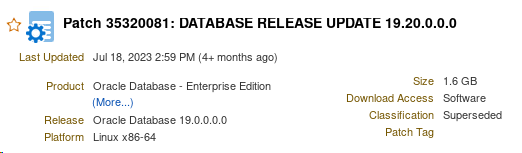
Before you can apply the patch, and as indicated in the README file regarding the patch prerequisites, you must have Opatch version Opatch .2.0.1.37 or later. I always recommend downloading the latest version of OPatch
1) Download the OPatch the following Oracle website.
oracle

Currently the available version is version 12.2.0.1.40.
To apply this version, go to your database's ORACLE directory, rename the existing "OPatch" directory, and extract the patch you just downloaded.
[oracle sw]$ cdORACLE
[oracle sw]$ mv OPatch OPatch
[oracle sw]$ unzip p6880880_190000_Linux-x86-64.zip
Archive: p6880880_190000_Linux-x86-64.zip
creating: OPatch
creating: OPatch
inflating: OPatch.txt
inflating: OPatch.txt
inflating: OPatch.txt
inflating: OPatch
.
.
We verify that the OPatch version OPatch correct.
[oracle OPatch]$ .opatch
OPatch : 12.2.0.1.40
OPatch .
2) Unzip the patch
cd /tmp/patch1920/35320081
unizp p35320081_190000_Linux-x86-64.zip
ls -lrt /tmp/patch1920/35320081
drwxr-xr-x. 5 oracle oracle Jul 15 21:54 35320081
-rw-rw-r–. 1 oracle oracle Jul 18 15:03 PatchSearch.xml
-rw-rw-r–. 1 oracle oracle Nov 15 17:54 p35320081_190000_Linux-x86-64.zip
3) We run the Precheck to check that there are no discrepancies.
Inside the directory created when unzipping (/tmp/parche1920/35320081/35320081), we launch the following command:
opatch CheckConflictAgainstOHWithDetail -ph ./
opatch CheckConflictAgainstOHWithDetail -ph ./
Oracle Interim Patch Installer Oracle 12.2.0.1.40
Copyright (c) 2023, Oracle . All Rights Reserved.
PREREQ session
Oracle root directory Oracle /u01/sw
Central inventory: /u01/oraInventory
from: /u01/sw/oraInst.loc
OPatch version OPatch 12.2.0.1.40
OUI version: 12.2.0.7.0
Log file location:opatch.log
Invoking prereq “checkconflictagainstohwithdetail”
Prereq “checkConflictAgainstOHWithDetail” passed.
OPatch .
In RAC environments, the patch will be installed in rolling mode (no downtime). If we are not in RAC environments, as in our example, it is necessary to shut down all databases belonging to the ORACLE to be patched, as well as the listeners associated with those databases, before the patch can be applied.
[oracle 35320081]$ sqlplus / as sysdba
SQL*Plus: Release 19.0.0.0.0 – Production on Wed Nov 15 23:39:23 2023
Version 19.3.0.0.0
Copyright (c) 1982, 2019, Oracle. All rights reserved.
Connected to:
Oracle 19c Edition Release 19.0.0.0.0 – Production
Version 19.3.0.0.0
SQL> shutdown immediate;
Database closed.
Database dismounted.
ORACLE shut down.
[oracle 35320081]$ lsnrctl stop
LSNRCTL for Linux: Version 19.0.0.0.0 – Production on 15-NOV-2023 23:40:10
Copyright (c) 1991, 2019, Oracle. All rights reserved.
Connecting to (ADDRESS=(PROTOCOL=tcp)(HOST=)(PORT=1521))
The command completed successfully
You can now apply the patch.
The easiest way is to go to the directory where the extracted patch is located and run the OPatch utility OPatch follows:
unzip -d <PATCH_TOP_DIR> p35320081_<version>_<platform>.zip
cd <PATCH_TOP_DIR> 35320081
opatch apply
Here we show the output:
[oracle 35320081]$opatch
Oracle Interim Patch Installer Oracle 12.2.0.1.40
Copyright (c) 2023, Oracle . All Rights Reserved.
Oracle root directory Oracle /u01/sw
Central inventory: /u01/oraInventory
: /u01/sw/oraInst.loc
OPatch version OPatch 12.2.0.1.40
OUI version: 12.2.0.7.0
Log file location:opatch.log
Verifying environment and performing prerequisite checks…
OPatch with these patches: 35320081
Do you want to continue? [y|n]
y
User Responded with: Y
All checks passed.
Shut down any Oracle instances running outside of this ORACLE on the local system.
( Oracle Root Directory Oracle ‘/u01/sw’)
Is the local system ready to be patched? [y|n]
y
User Responded with: Y
Backing up files…
Applying patch to component oracle.xdk.rsf, 19.0.0.0.0…
Applying patch to component oracle.ldap.client, 19.0.0.0.0…
Applying patch to component oracle.mgw.common, 19.0.0.0.0…
Applying patch to component oracle.odbc, 19.0.0.0.0…
.
.
Patch 35320081 successfully applied.
Applying patch to component oracle.xdk.rsf, 19.0.0.0.0...
Applying patch to component oracle.ldap.client, 19.0.0.0.0…
Applying patch to component oracle.mgw.common, 19.0.0.0.0…
Applying patch to component oracle.odbc, 19.0.0.0.0…
.
.
Patch 35320081 successfully applied.
At this point, we can open the patched ORACLE database.
[oracle 35320081]$ sqlplus / as sysdba
SQL*Plus: Release 19.0.0.0.0 – Production on Wed Nov 15 23:39:23 2023
Version 19.20.0.0.0
Copyright (c) 1982, 2019, Oracle. All rights reserved.
Connected to:
Oracle 19c Edition Release 19.0.0.0.0 – Production
Version 19.20.0.0.0
SQL> startup
Database started.
4) Post-installation steps.
Once the patch has been applied, the following action must be performed (not necessary for Oracle client).
% cdOPatch
%./datapatch -verbose
We raise the listener.
[oracle 35320081]$ lsnrctl start
We verified that the database patch had been successfully applied by running the `opath lspatches` command.
[oracle 35320081]$ opatch lspatches
35320081;Database Release Update: 19.20.0.0.230718 (35320081)